Want to ask a question, share a fishing report, or start a discussion? Here’s how.
Note: You need to be logged in to start a new topic. If you don’t have an account yet, click Sign Up in the top-right corner — it’s free and only takes a minute.
Find the New Topic Button
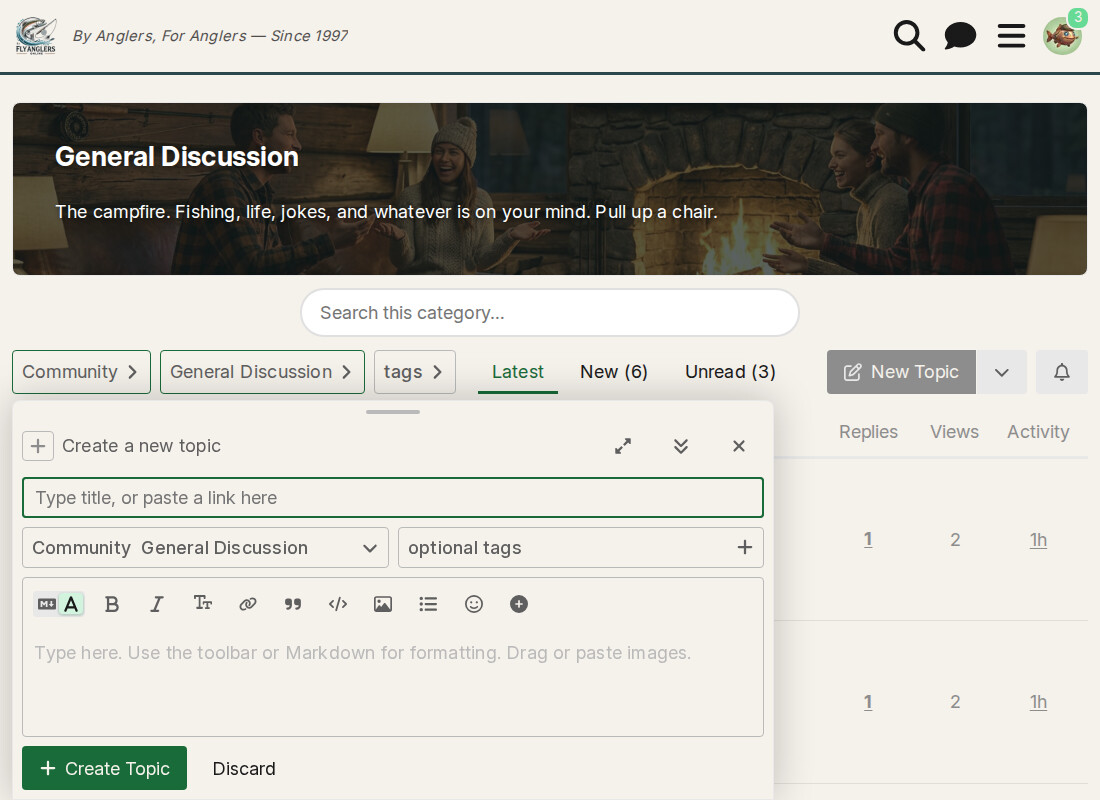
Navigate to the category where you’d like to post (for example, General Discussion). Look for the + New Topic button in the upper right area of the topic list.
Fill In Your Topic
A composer will open with a few fields to fill in:
- Title — Give your topic a clear, descriptive title. “Help with dry fly selection for spring creeks” is better than “Question.”
- Category — Should already be set to the category you were in. You can change it with the dropdown if needed.
- Tags — Optional. Add a tag or two if it helps people find your topic (like “trout” or “dry-fly”).
- Your message — Type your post in the main text area. You’ll see a preview on the right side.
Post It
Click the green + Create Topic button to publish. Your new topic will appear at the top of the category.
Just want to join an existing conversation instead? See How to Reply to a Topic.
— Rusty McFins